

© 2026 Center for Digital Innovation and AI
- Page d'accueil
- Gestion de son espace
- Activities
- Activité TestCréation de l'activité testFeeding the question bankParamétrage d'un test en ligne à distanceParamétrage d'un test en ligne en présentielAdding question to quiz manuallyRandomly add questions to quizBlock concurrent connectionsUser overridesMélanger les questions d'une ou plusieurs sectionsin case of connection lost
- Notification
- Online Evaluation Checklist
This tutorial is to support teachers who wish to deposit video resources on the Moodle.USJ platform. This tutorial explains how to:
A. AJOUT D’UNE VIDÉO INTERACTIVE
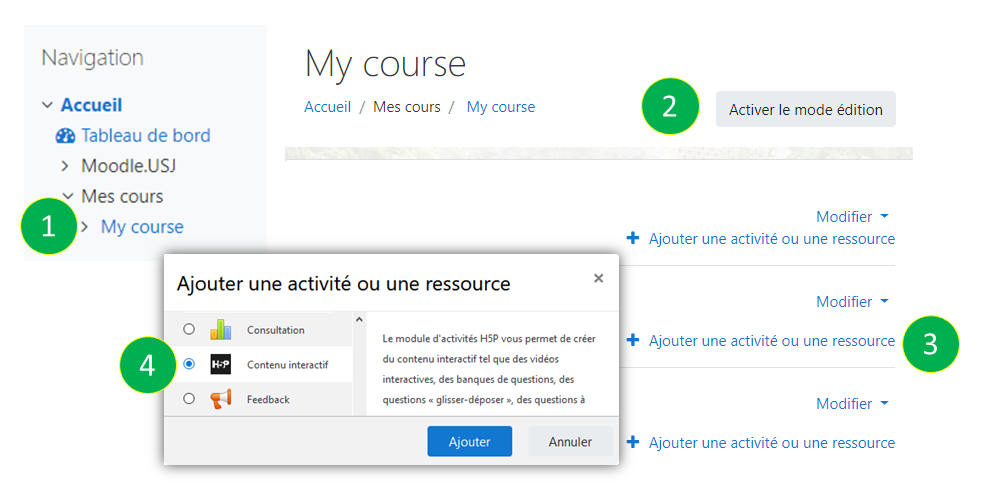
- Access your course by clicking on the "My courses" label in the "Navigation" block and then select your course
- Activate edit mode by clicking on "Activate edit mode" button
- Click on “Add an activity or a resource”
- Choose "Interactive Content" and click "Add"
B. PARAMÉTRAGE DE L’ACTIVITÉ
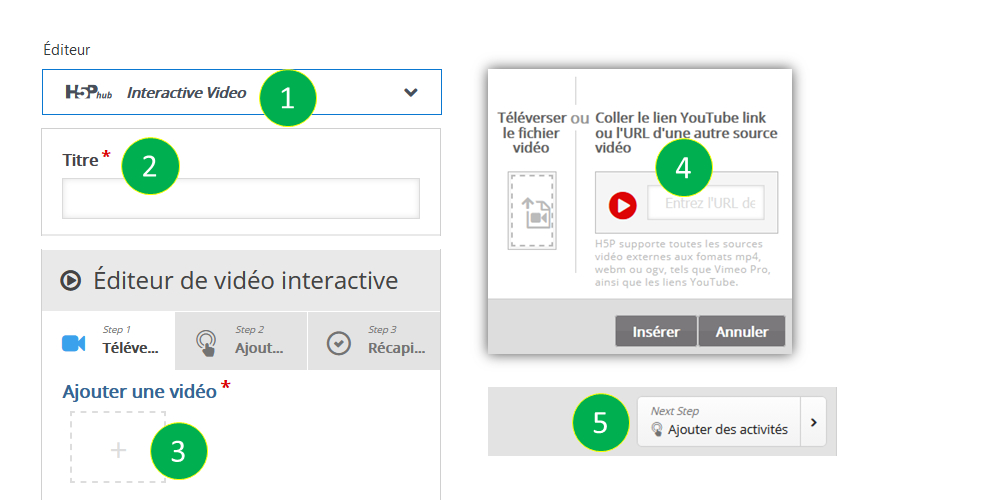
- Choose the “Interactive Video” option
- Give your video a title
- Click on the box " Add a video "
- You can upload a video (which does not exceed 16 MB) from your computer or indicate the URL of a video available on YouTube or the URL of another video source
- Click on "add activities" to add interactions (see C. Adding interactions)
C. ADDING INTERACTIONS
Utilisez la barre d’outils au-dessus du clip vidéo pour ajouter des interactions. Il existe différents types d’interactions au choix, à savoir : choix unique, choix multiple et vrai/faux.

To add a question, start the video and then pause where you want to insert the question. When you choose the question, you must:
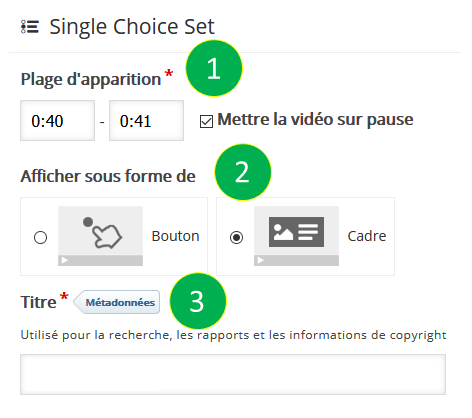
- Précisez la plage d’apparition du titre (2 secondes suffisent) et cochez “mettre la vidéo sur pause”.
- Choisissez l’affichage de la question sous forme « Bouton » si vous souhaitez que l’utilisateur clique dessus pour faire apparaître l’activité, ou « Cadre » si vous souhaitez que l’activité s’affiche directement sous la forme d’un cadre en surimpression sur la vidéo.
- Enter metadata (description) in the title field to facilitate searching.
-
- Question à choix unique : permet de créer des questionnaires à choix unique.
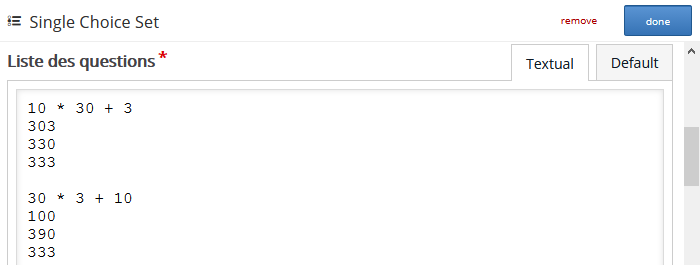
- A simple way to enter the question(s) and answers. Click the “Textual” option. The first answer you input must be the correct answer.
- Question à choix unique : permet de créer des questionnaires à choix unique.
-
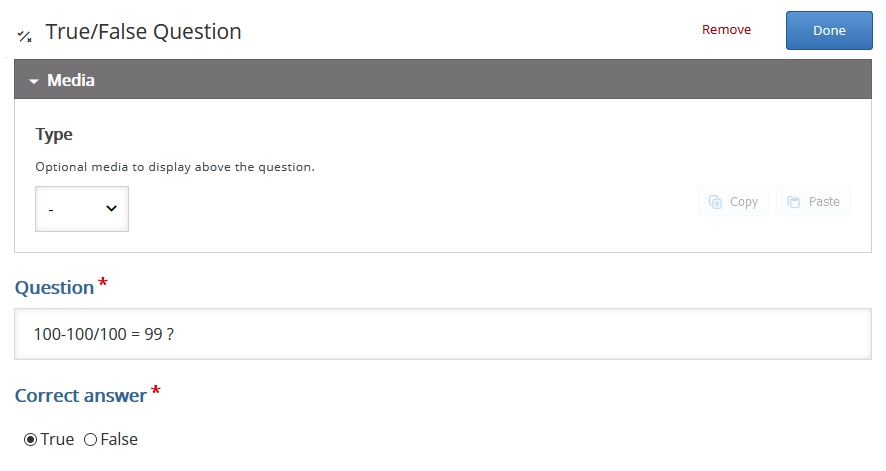
- Vrai/Faux : permet de créer des questionnaires vrai/faux.
- You can add an image/video in the “Image or video” field
- Enter the question in the "Question" field
- Choose whether the answer is correct or not in the “Correct answer” field
- Once finished, click on the “Done” button.
- Vrai/Faux : permet de créer des questionnaires vrai/faux.
-
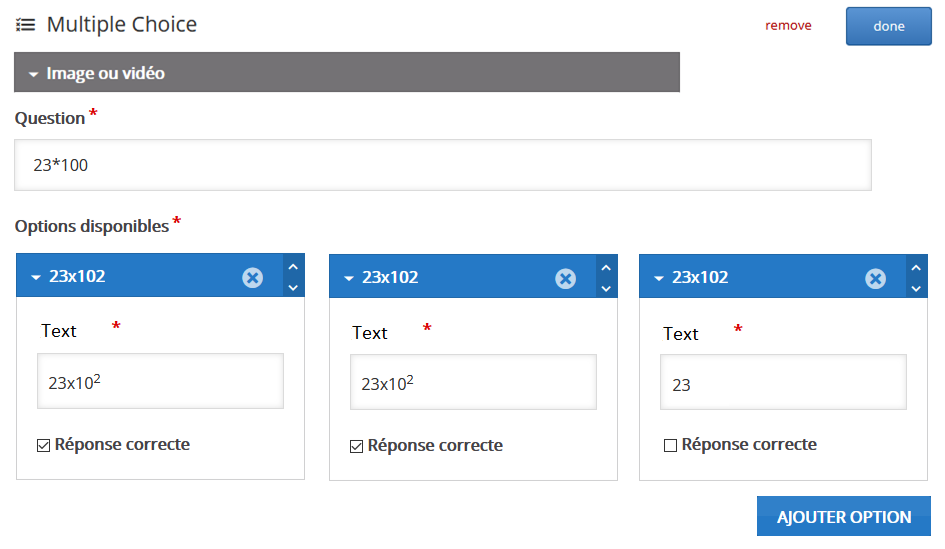
- Question à choix multiple : permet de créer des questionnaires à choix multiple.
- You can add an image/video in the “Image or video” field
- Enter the question in the "Question" field
- Enter the proposed answer(s) in the “Options” fields and indicate the correct answer(s) or shuffle the answers. Note that you can add as many options as you want
- Once finished, click on the “Done” button.
- Question à choix multiple : permet de créer des questionnaires à choix multiple.
This tutorial is to support teachers who wish to deposit video resources on the Moodle.USJ platform. This tutorial explains how to:
A. ADD AN INTERACTIVE VIDEO
- Access your course by clicking on the “My courses” label in the “Navigation” block and then select your course
- Activate edit mode by clicking on “Activate edit mode” button
- Click on “Add an activity or a resource”
- Choose “Interactive Content” and click “Add»
B. ACTIVITY SETTINGS
- Choose the “Interactive Video” option
- Give your video a title
- Click on the box “Add a video”
- You can upload a video (which does not exceed 16 MB) from your computer or indicate the URL of a video available on YouTube or the URL of another video source
- Click on “add activities” to add interactions (see C. Adding interactions
C. ADDING INTERACTIONS
Use the toolbar above the video clip to add interactions. There are different types of choices for interactions, namely: single choice, multiple choice and true/false.
To add a question, start the video and then pause where you want to insert the question. When you choose the question, you must:
- Specify the range of appearance of the title (2 seconds is enough) and check “pause the video”.
- Choose to display the question as “Button” if you want the user to click on it to bring up the activity, or “Frame” if you want the activity to display directly as a frame superimposed on the video.
- Enter metadata (description) in the title field to facilitate searching.
-
- Single-choice question: Allows you to create a single-choice quiz.
- A simple way to enter the question(s) and answers. Click the “Textual” option. The first answer you input must be the correct answer and the choices are always shuffled (cannot be modified)
- Single-choice question: Allows you to create a single-choice quiz.
-
- True/False: allows you to create a true/false quiz.
- You can add an image/video in the “Image or video” field.
Enter the question in the “Question” field.
Choose whether the answer is correct or not in the “Correct answer” field.
Once finished, click on the “Done” button.
- You can add an image/video in the “Image or video” field.
- True/False: allows you to create a true/false quiz.
-
- Multiple-choice question: Allows you to create a multiple-choice quiz.
- You can add an image/video in the “Image or video” field.
- Enter the question in the “Question” field.
- Enter the proposed answer(s) in the “Options” fields and indicate the correct answer(s) or shuffle the answers. Note that you can add as many options as you want.
- Once finished, click on the “Done” button.
- Multiple-choice question: Allows you to create a multiple-choice quiz.




CINIA is located on the 7th floor of the USJ Human Sciences Campus on Damascus Street in Beirut.
Do not hesitate to contact us at cinia@usj.edu.lb
or call us on +961 1 421 000 extension 5923/5924 or on +961 1 421 094
© 2026 Center for Digital Innovation and AI. Created for free using WordPress and Kubio

